
November 23, 2026
|
6
minute read
What's new: Lexi Activations. From question to Klaviyo audience in one conversation




The latest Lexi beta release adds four things. You can send a saved Segment straight to Klaviyo, and nothing goes out until you approve it. Segment dashboards show how every Segment you save is trading, with Black Friday and Cyber Monday marked on the timeline. Answers come back faster, including queries that used to time out, and error messages now tell you what went wrong. Here's how to use each one.
Much of this release started as feedback from beta teams, and most of it closes the gap between finding an audience and doing something with it. Until now, a Segment built in Lexi still had to be exported and uploaded before your email team could use it. With peak trading under way, that step cost time you didn't have. If you missed the previous Lexi beta release, it covers Segments, Skills, Dashboards, Memory and the knowledge base.
1. Send a saved Segment straight to Klaviyo
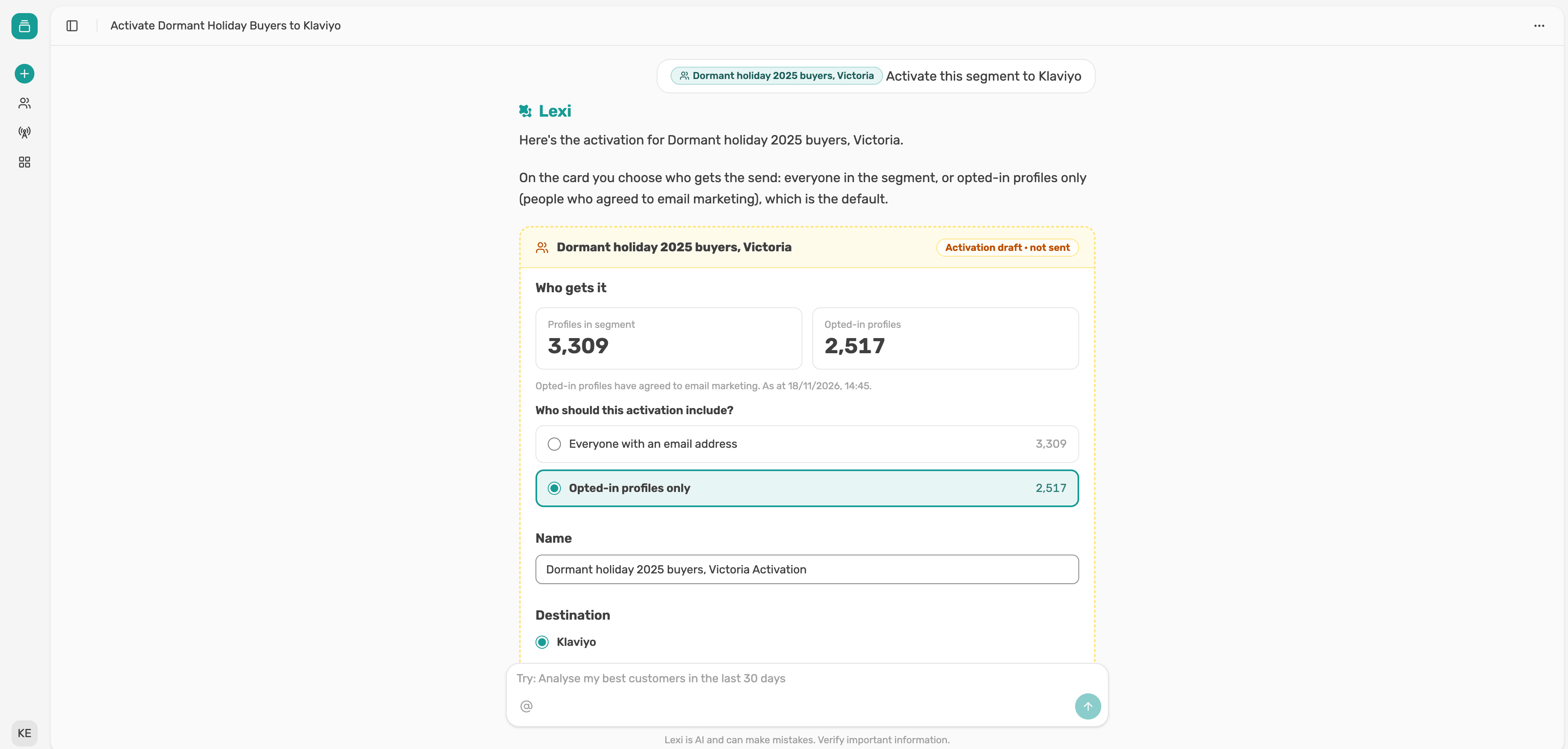
Pick any saved Segment, choose Klaviyo, and Lexi walks you through the send. You review the audience and approve it before anything goes to Klaviyo, so the person who knows the campaign stays in charge of what's sent.
Before your first send, your customer success manager connects your Klaviyo account to Lexi. After that, any saved Segment can go to Klaviyo from the same conversation you built it in. Here's a question worth trying this week: "Who bought full price last Black Friday but hasn't bought since? Save them as a Segment." Check the size, approve the send, and the list is ready for your email team.
Klaviyo is the first destination, and more are on the way. The Activations page explains how sending works, and step-by-step guides are on the Lexi help site.
2. See how every Segment trades on a dashboard
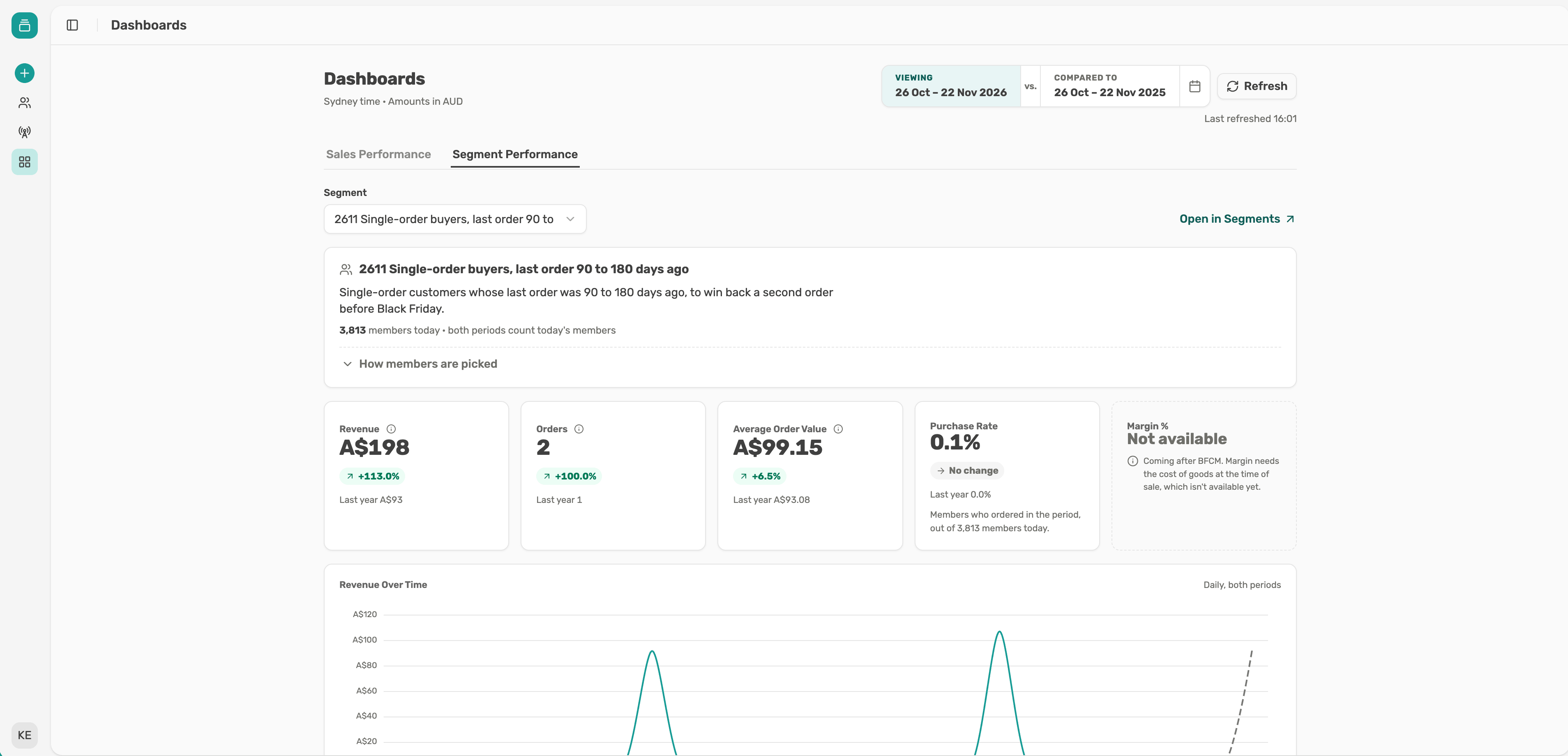
Saving a Segment is only half the job. You also want to know whether the people in it are buying. In Dashboards, open the Segment performance tab and pick a Segment to see how it has traded over time.
Black Friday and Cyber Monday are marked on the timeline, so you can see straight away how a group behaved over last year's peak and compare it with this year as the weekend plays out. If you sent a Segment to Klaviyo, this is where you check what happened next.
A good first use is your VIPs or your most recent first-time buyers: open their Segment after the weekend and see whether they bought, and how their spend compares with the same weekend last year. The Reporting page shows what else Dashboards can track.
3. Get faster answers to bigger questions
Tables load faster, and queries that used to time out now come back with an answer. That matters most for the questions that span your whole customer base and several years of data, which are often the ones worth asking.
If Lexi stalled on a big question before, ask it again. A good one to retry: "How do customers who shop both online and in store compare with customers who only use one channel?" It's a question most teams can't answer without an analyst, and it's one Lexi can now handle in a single conversation.
4. Read error messages that tell you what to do next
When a question can't be answered, Lexi now tells you what didn't work instead of showing "something went wrong". That might mean the time period has no data, or a field you asked about isn't available.
A clear message tells you whether to narrow the question, change the date range or ask about something else, so you spend less time guessing and more time on the answer you came for.
5. Try this: turn first-time buyers into second orders
Your second order is where loyalty starts, and peak trading brings in more first-time buyers than any other time of year. Here's a prompt to copy into Lexi:
"Who bought from us for the first time in the last 90 days and hasn't come back? Save them as a Segment and suggest what would bring them back for a second order."
Then open Dashboards, choose the Segment performance tab and compare your new Segment with the same group last year. If Klaviyo is connected, send it from Lexi and watch the dashboard over the following weeks.
Run it again in early January, once your Black Friday and Christmas first-timers have had time to come back or drift away. One-time buyers likely to return shows how to find the ones worth chasing first, and repeat purchase rate over six months gives you the number to track. Running venues rather than stores? The same idea works for turning first-time guests into regulars.
6. What's coming next
More places to send Segments are on the way, so you can reach customers wherever your team already markets. We're also starting Lexi masterclasses, where beta teams work with Lexer to build skills for the questions their teams ask most. Beta teams will hear about both by email first.
From question to Klaviyo audience in one conversation
This release takes you from question to Klaviyo audience in one conversation, then shows you on a dashboard whether that audience bought. With the busiest trading weeks of the year under way, that's time back for the work only your team can do. If you're planning your post-peak review, our Black Friday profit playbook covers what to measure once the rush is over.
Book a demo to see what Lexi can do with your Segments, from first question to Klaviyo audience.